golocaldownload
Turn a server directory into a browsable, searchable, downloadable file site
Stack
- Go
- Gin
- 内嵌静态资源
- Bootstrap 5
- Docker
A local file download service written in Go + Gin: point it at a directory on your server to use as the "download library", then browse directories, search file names globally, and download files right from the browser. Page templates and static assets are all embedded into the binary, so a release is a single executable — configuration defaults are embedded too, which means unpack and run.
| Repo | URL |
|---|---|
| GitHub | https://github.com/kite88/golocaldownload |
| GitCode | https://gitcode.com/kite88/golocaldownload |
| Gitee | https://gitee.com/kite88/golocaldownload |
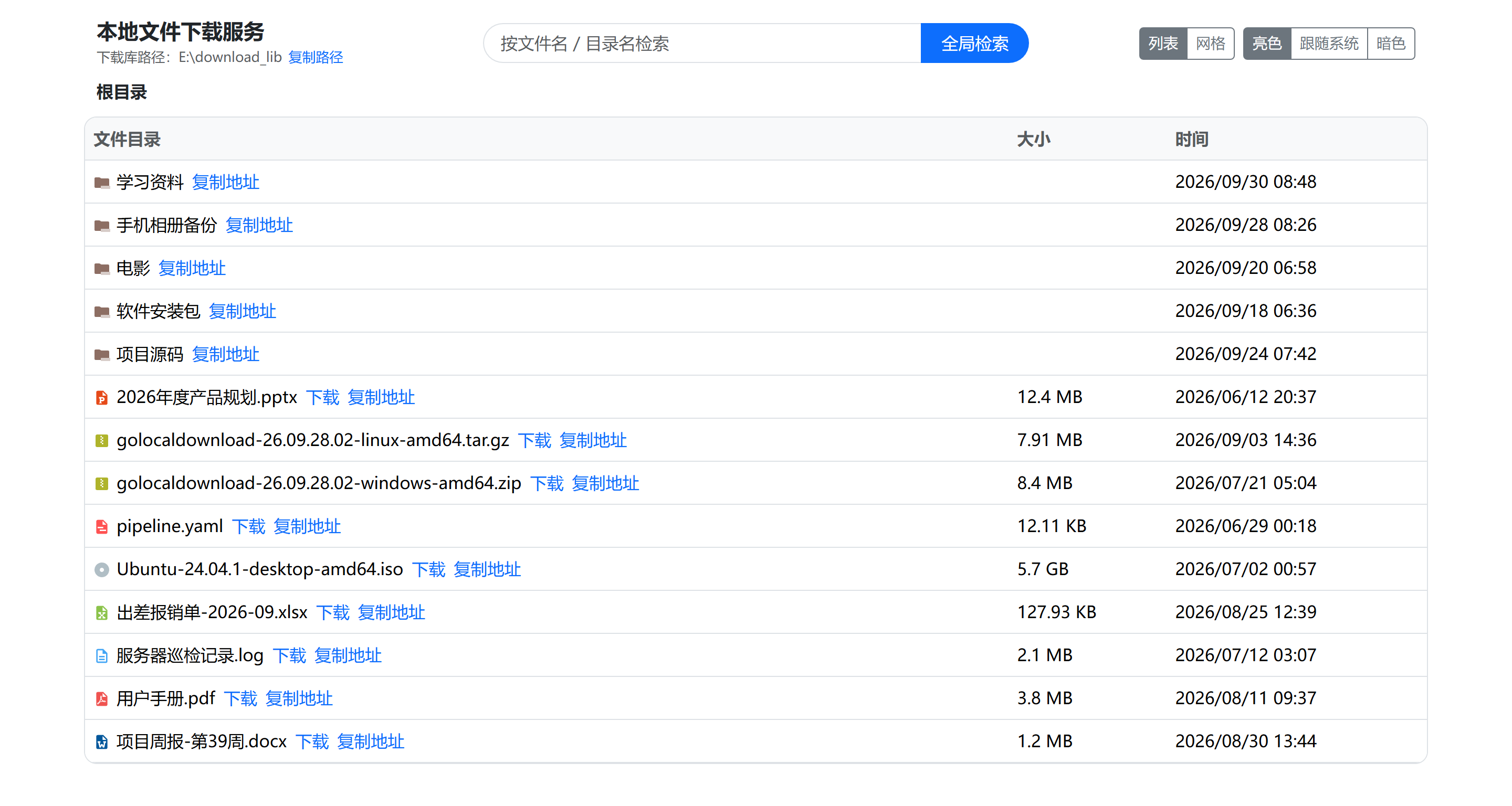
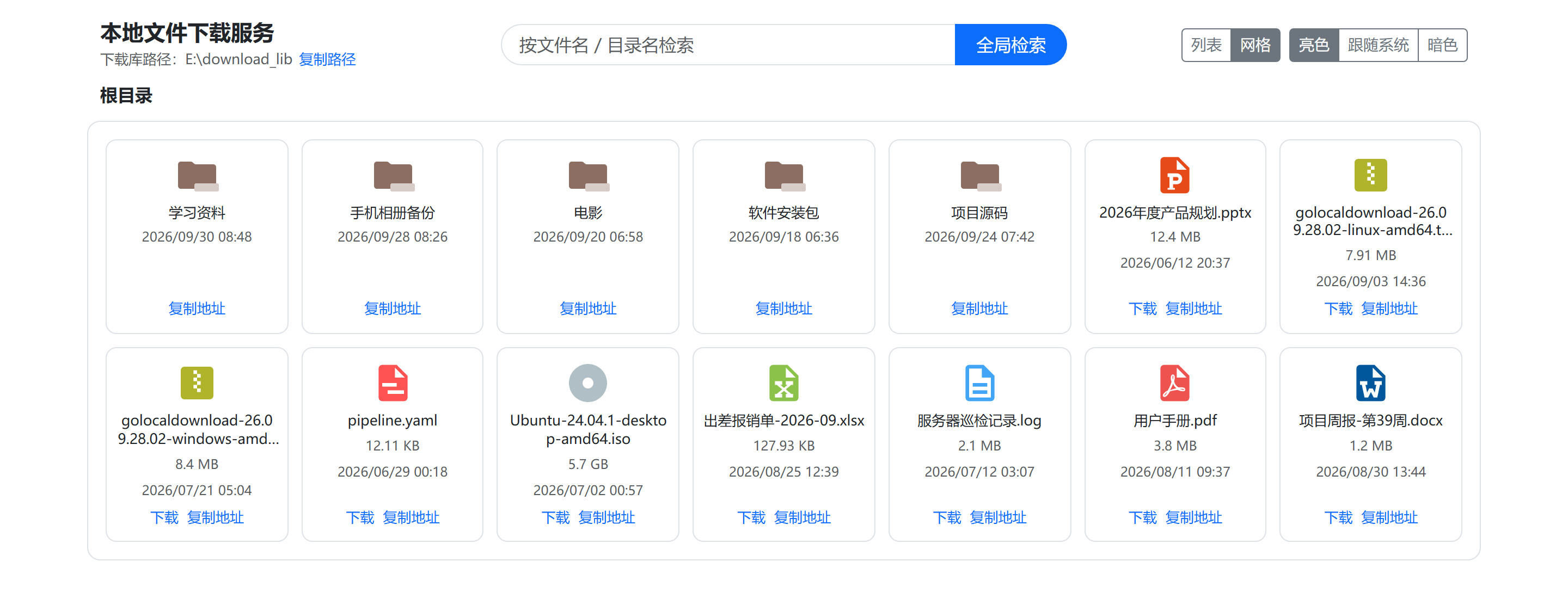
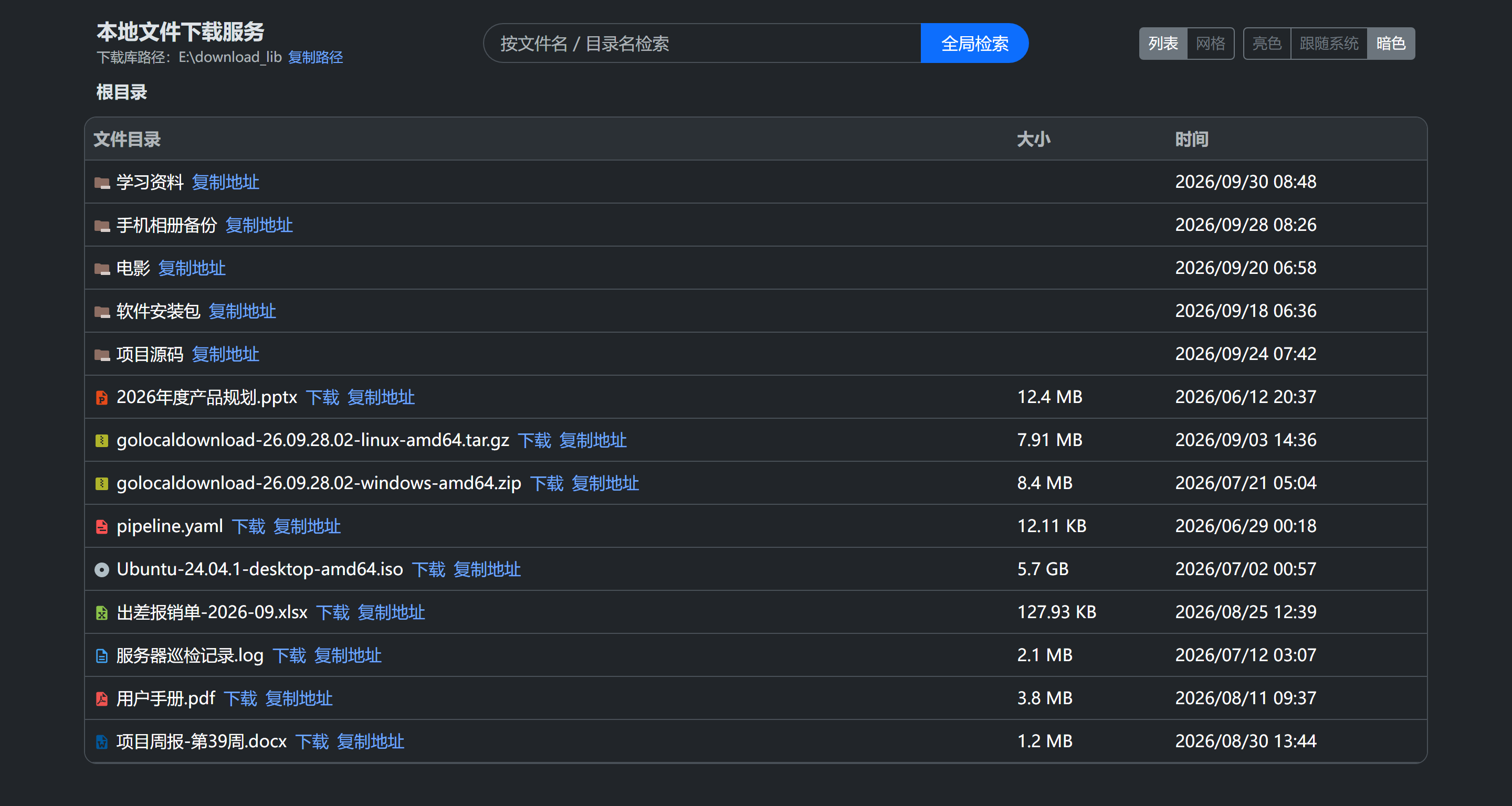
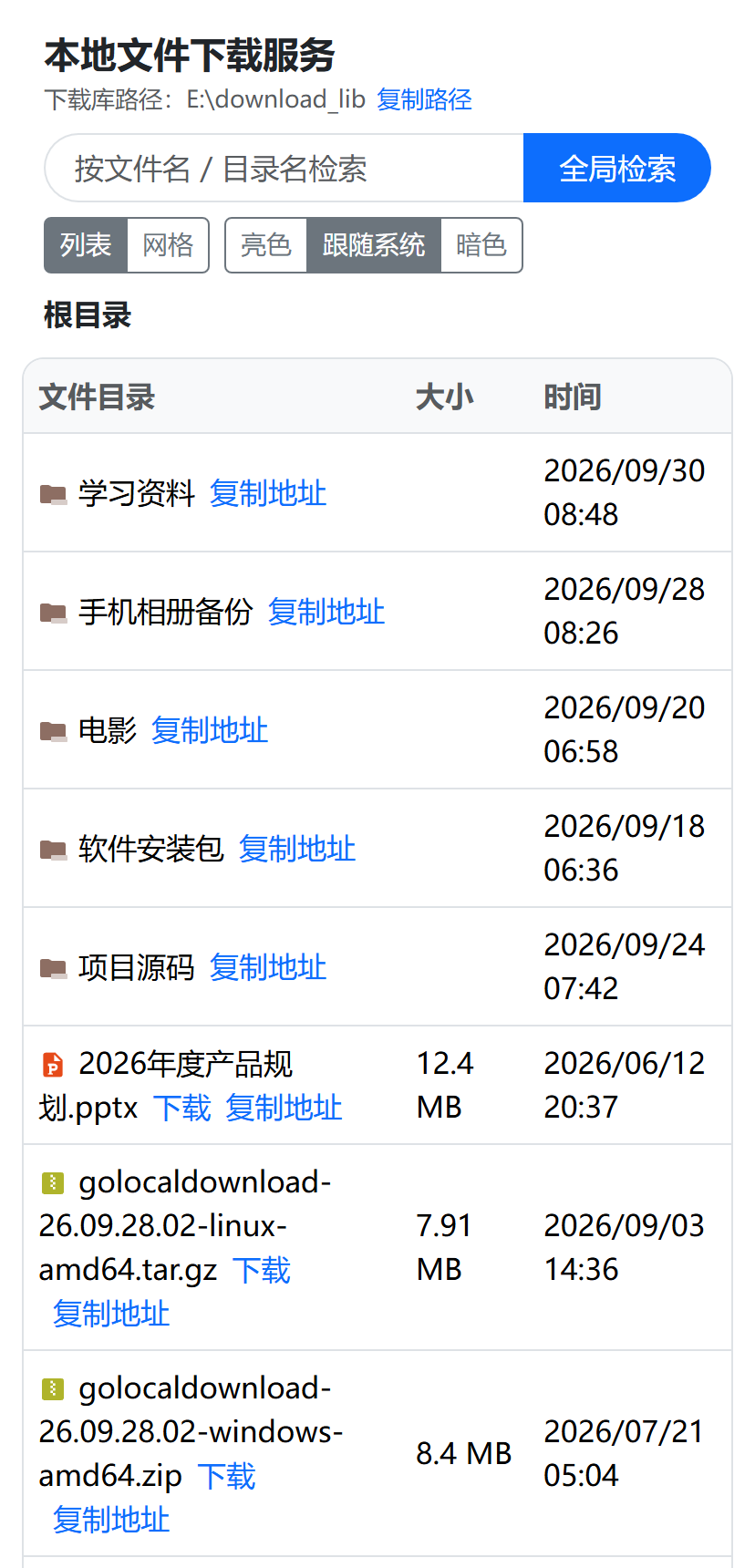
Screenshots
Captured from a real
go run .session with the download library pointed atE:\download_lib; the path under the title is exactly that directory (inside a container it shows the mapped host directory instead).
| List view: directories first, with size and modification time | Grid view: icons chosen by extension |
|---|---|
 |
 |
| Dark theme: light / follow system / dark | Narrow screens: stacks vertically in a phone browser |
|---|---|
 |
 |
Features
- Directory browsing: navigate level by level with breadcrumbs; directories sort before files, with size and modification time displayed.
- Type-based icons: archives / images / videos / audio / documents / spreadsheets / code
etc. get different icons based on file extension (icons from Material Icon Theme, MIT, see
web/static/icon/material/LICENSE.txt); unknown extensions fall back to a generic document icon. - Global search: case-insensitive substring matching on file names, with one-click jump to the directory containing the file.
- File download: non-ASCII file names (Chinese, spaces, etc.) are encoded per RFC 5987, so browsers never save them with garbled names.
- One-click copy links: files copy as ready-to-use absolute download URLs (browsers,
wget, and download managers all work directly); directories copy the page URL pointing to that directory (generated according to how you're currently accessing — localhost or LAN IP). "Copy path" below the title copies the absolute path of the download library itself (inside a container this is the mapped directory on the host). The link briefly shows "Copied" after copying. - Theme switching: light / follow system / dark, with the choice stored in the browser; the theme is applied on first paint so there's no white flash in dark mode.
- List / grid views: the list view suits checking sizes and times, the grid view suits recognizing content by icons (images, archives, etc.); toggle with one click in the top-right corner, and the choice is stored in the browser as well. Both views share the same data, so switching never re-requests the API.
- Path traversal protection: listing, searching, and downloading only allow paths inside
the download library; directory-traversal attempts like
../are rejected outright. - Single-file delivery: page templates, static assets, and config templates are all embedded; no external files needed at runtime.
- Graceful shutdown:
Ctrl+CorSIGTERMwaits for in-flight downloads to finish before exiting, so large transfers never get cut off.
Feature Walkthrough
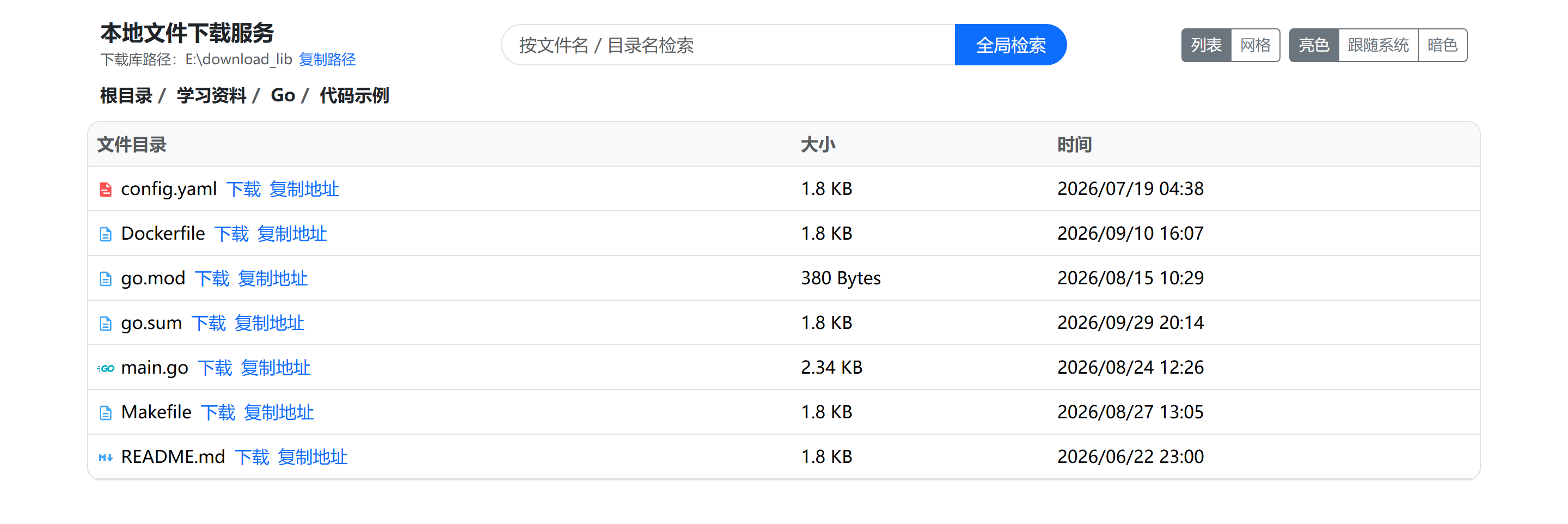
1. Directory browsing and breadcrumbs
Click a directory name to descend; the breadcrumb expands level by level and any level can be jumped back to directly. Directories sort before files, and the list and grid views share one dataset — switching only re-renders, it never re-requests the API.
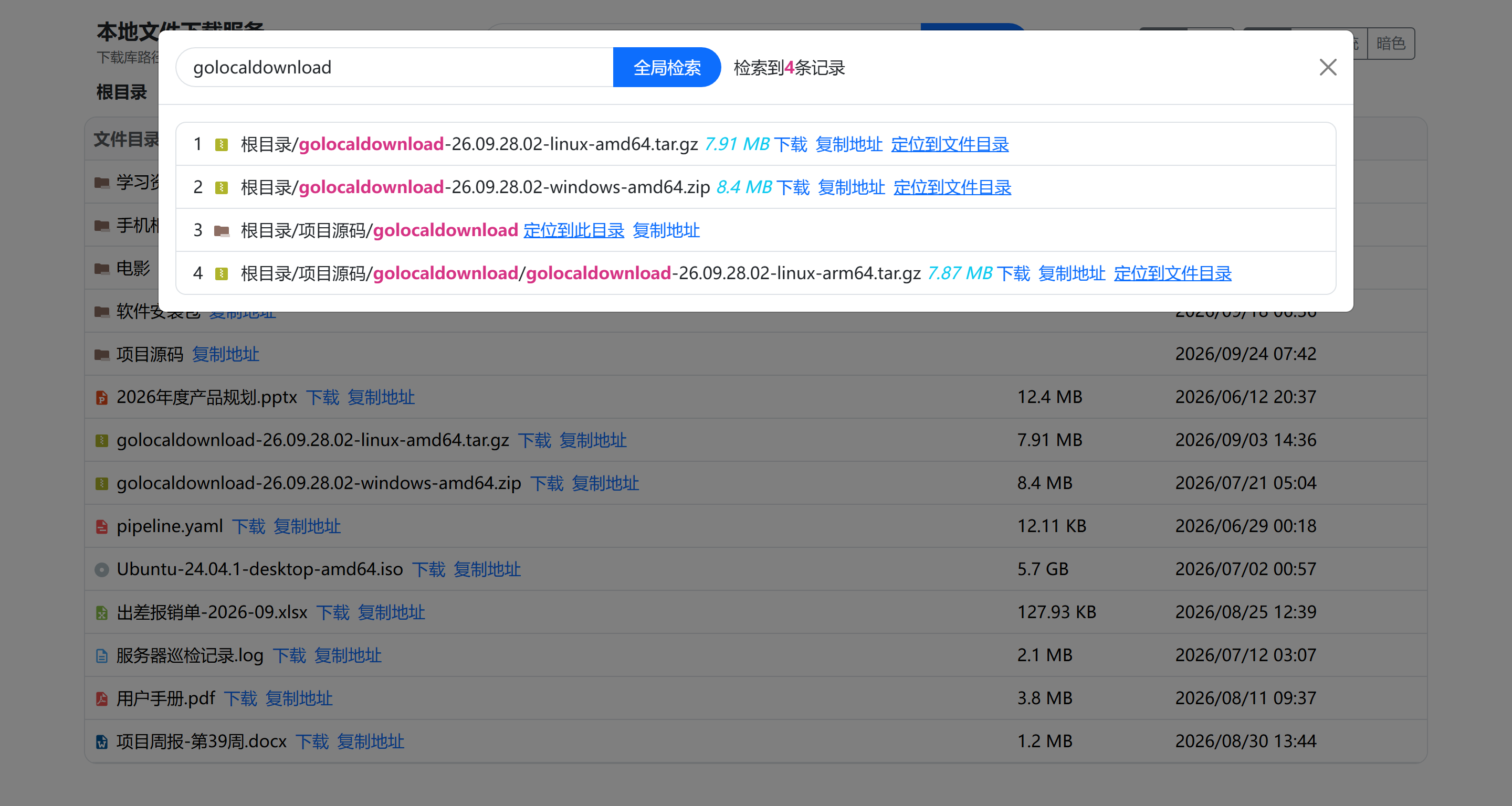
2. Global search
Case-insensitive substring matching on file / directory names (500 results max), with both the matched keyword and the full path highlighted. Every result offers "Download" and "Copy link" directly, plus "Go to this directory" for directories and "Go to the containing directory" for files, so you can jump to the right level in one click.
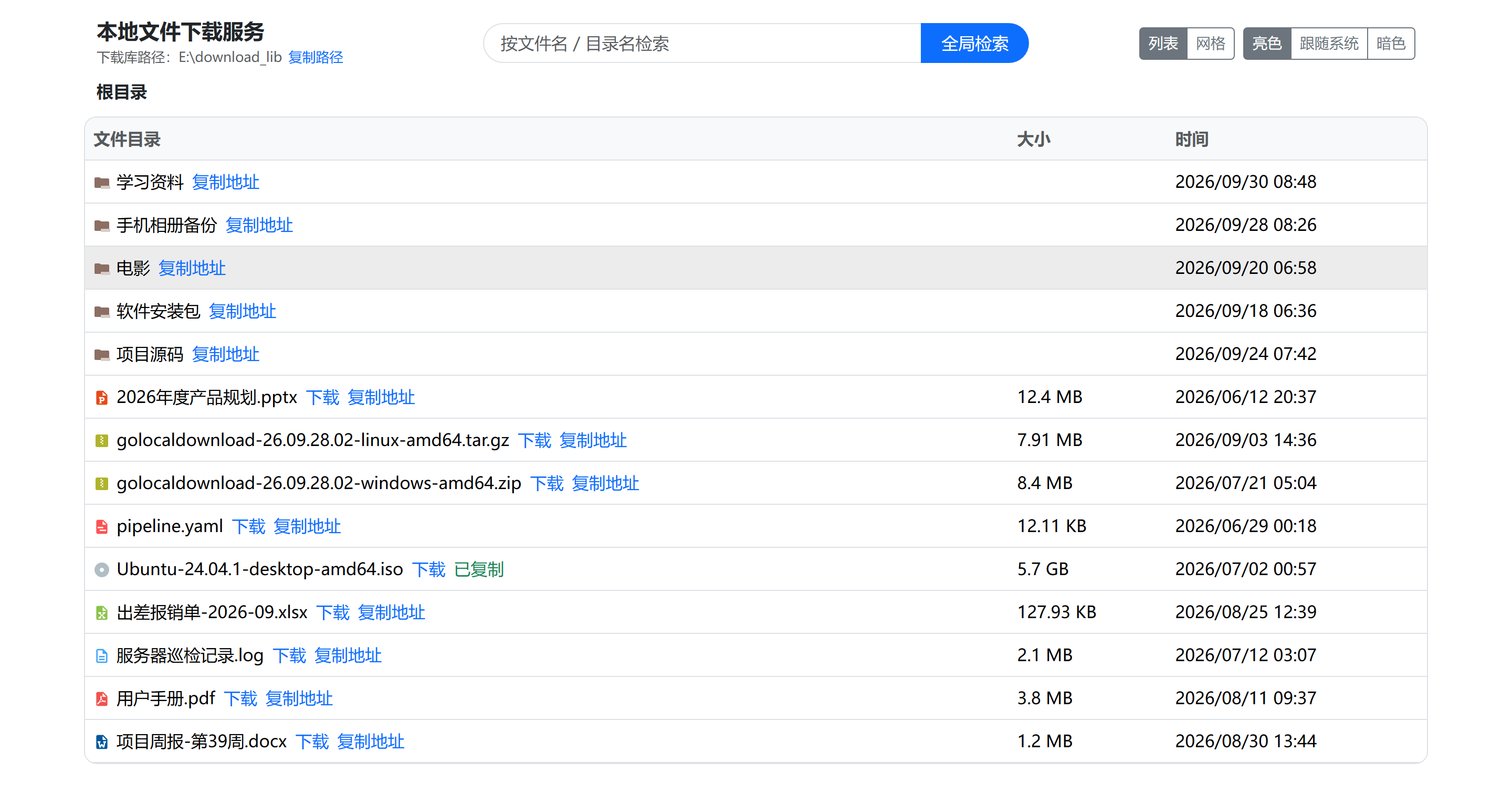
3. Downloading and one-click copy
"Download" uses the browser's native download; "Copy link" copies a ready-to-use absolute URL
(http://<host>:9801/api/download?data=...) that works when pasted into a browser, wget, or a
download manager, while directories copy the page URL pointing to that directory. After copying,
the link briefly turns into a green "Copied".
Project Layout
.
├── main.go                 Entry point: wires config, router, graceful shutdown
├── config/                 Config loading (embedded env.ini.<env> templates + external env.ini override)
├── common/                 Utilities: directory prep, safe path resolution, size formatting
├── handle/                 The three handlers: list / search / download
├── router/                 Route assembly: pages, static assets, API group
├── test/                   In-process router integration tests
├── web/
│   ├── view/index.html     Page template (embedded)
│   └── static/             Bootstrap / jQuery / icons / frontend scripts (embedded)
├── tools/pack/             Archiver: makes zip and tar.gz reproducible (invoked by build scripts)
├── start.bat / start.sh    Launchers: sit next to the binary, double-click / ./ to run (shipped in the archives)
├── build.ps1 / build.sh    Cross-compile all platforms
├── Dockerfile              Two-stage minimal image build
└── .github/workflows/      Release flow: checks/tests → cross-compile & Release → push multi-arch images
Quick Start
Requires Go 1.23 or later.
# Run directly in dev mode
go run .

# Or build then run
go build -o golocaldownload . && ./golocaldownload
On startup it prints the version, config source, download library directory, and accessible URLs — visit any of them:
2026-09-28 10:00:00 golocaldownload dev (debug)
Config source: config/env.ini
Download library: E:\download_lib
Local access: http://127.0.0.1:9801
LAN access: http://192.168.1.10:9801
Drop the files you want to serve into the download library directory and refresh the page.
Command-line Flags
| Flag | Default | Description |
|---|---|---|
-config |
empty | Path to an external config file (INI); when empty, auto-discovery applies per the priority list below |
-version |
false |
Print the version and exit |
Configuration
The config file is INI format (config/env.ini.<env> are the templates in the repo):
| Key | Default | Description |
|---|---|---|
env_mode |
release |
Run mode: debug / release / test; invalid values fall back to release |
download_lib_path |
download_lib |
Download library directory; relative or absolute paths, multi-level directories are created automatically; empty means the program's current working directory |
display_lib_path |
empty | Download library path shown on the page; when empty, the container-mapped host directory is auto-detected (see the "Mount paths" section), falling back to the real path if undetectable |
server.protocol |
http |
Only used to build the access URLs in startup logs; does not change actual listening behavior |
server.http_port |
9801 |
Listening port |
Config sources, highest to lowest priority:
- The file specified by the
-configflag /GLD_CONFIGenv var (must exist if specified); env.iniin the working directory;config/env.iniin the working directory;- The embedded
env.ini.<GLD_ENV>in the binary (GLD_ENVdefaults torelease); - The embedded
env.ini.releasein the binary.
Compared with the old version,
download_lib_pathnow accepts multi-level paths like./a/b(created level by level), and you no longer need to renameenv.ini.localtoenv.inijust to compile: embedded templates are used by default, so a fresh clone builds with plaingo build.
Cross-Compilation
.\build.ps1                      # Windows (PowerShell 5.1 / 7)
.\build.ps1 -OutDir D:\tmp\dist  # Different output directory
./build.sh                       # macOS / Linux
./build.sh -o /tmp/gld-dist      # Different output directory
The target matrix lives at the top of both scripts — add or remove a line to change it. Default coverage:
| OS | Architectures |
|---|---|
| Windows | amd64 / arm64 / 386 |
| Linux | amd64 / arm64 / 386 / arm(v7) / ppc64le / s390x / riscv64 / loong64 |
| macOS | amd64 / arm64 |
| FreeBSD | amd64 / arm64 |
Both scripts run the same target matrix and call the same packing tool, so artifacts are
byte-for-byte identical (same checksums). Output goes to dist/ by default (gitignored).
Following common convention, Windows gets zip archives and other platforms get .tar.gz
(zip doesn't preserve the Unix executable bit; only tar.gz lets Linux / macOS users run the
binary right after extracting):
dist/
├── golocaldownload-windows-amd64.zip    →  golocaldownload.exe + start.bat
├── golocaldownload-linux-arm64.tar.gz   →  golocaldownload + start.sh (both 0755)
├── ……                                    (15 platforms in total)
├── golocaldownload(.exe)                ← uncompressed binary for the host platform, for local use only, not published
└── checksums.txt                        ← SHA256 of the 15 archives (LF line endings, works with sha256sum -c)
Archived executables are versioned (from git describe; dev outside a git environment) —
check with golocaldownload -version. Every archive also carries a launcher (start.bat on
Windows, start.sh elsewhere): unpack and double-click / run it, and every argument is passed
straight through to the program, e.g. start.bat -config .\env.ini or
./start.sh -config /etc/gld/env.ini.
Archives are produced by
tools/packrather than systemtar/zip: Windows' bundledtar.exe(a stripped-down bsdtar) ignores Unix permission bits and doesn't support--mode, so its archives extract as 644 on Linux and won't run;zip(1)isn't guaranteed to exist on macOS / Linux, and implementations write inconsistent bytes.packuses the Go standard library to explicitly write 0755 and fixes timestamps, so archives and checksums are reproducible from the same source on any platform with either script; extra files such as the launchers go into the same archive via-add(name-inside-archive=source-path, repeatable).
Releasing
Push a v* tag or a date-based tag (e.g. 26.09.28.03, following the YY.MM.DD.NN
convention) and the workflow (.github/workflows/release.yml) does three things automatically:
- Checks & tests:
go vet ./...,go test ./...; - Create Release: cross-compile all platforms, self-verify artifacts with
sha256sum -c checksums.txt, then create the GitHub Release; - Push images: build linux/amd64 + linux/arm64 multi-arch images and push them to Docker Hub and Alibaba Cloud Container Registry.
git tag 26.09.28.03 && git push origin 26.09.28.03
A failure at any step aborts the release. Tags containing - (e.g. 26.09.28.03-rc1) are
marked as prereleases and will not overwrite the latest image tag.
Image push requires 4 Secrets
Repo → Settings → Secrets and variables → Actions (direct link:
https://github.com/kite88/golocaldownload/settings/secrets/actions):
| Secret | Where the value comes from |
|---|---|
DOCKERHUB_USERNAME |
Your Docker Hub login username (not the display name, not an email) |
DOCKERHUB_TOKEN |
A Docker Hub Access Token with Repo Read & Write scope; password login is deprecated by Docker Hub |
ALIYUN_REGISTRY_USERNAME |
The login username shown on the "Access Credentials" page of the Alibaba Cloud ACR console |
ALIYUN_REGISTRY_PASSWORD |
The fixed Registry password set on that same page (not your Alibaba Cloud account password, not an AccessKey) |
The two registries are independent switches: configuring just one pair works, and the
missing pair only logs a ::notice:: skip; if neither pair is configured the image job skips
entirely with a warning, without affecting Release creation.
Image addresses live in the workflow's env: — change these two lines when switching
accounts / regions:
ALIYUN_REGISTRY: registry.cn-shenzhen.aliyuncs.com
ALIYUN_IMAGE: registry.cn-shenzhen.aliyuncs.com/tutudev99/golocaldownload
Image builds explicitly disable
provenance/sbom: Alibaba Cloud ACR Personal Edition doesn't recognize the attestation manifests generated by BuildKit (application/vnd.oci.empty.v1+json), and leaving them on fails withdenied: unknown manifest class, blocking the whole push. Re-enabling requires splitting into two builds pushing to the two registries separately.
Deployment
How to choose: for code changes / long-term maintenance use Option 1; to just run the program use Option 2; with Docker available use Option 3 (local build) or Option 4 (compose); to just pull a prebuilt image use Option 5 (Docker Hub) or Option 6 (Alibaba Cloud).
How to Write Mount Paths (applies to all Docker options)
For the -v <host dir>:/root/download_lib in every Docker option, the right side must
always be /root/download_lib (the download library in the embedded config is a relative
path based on the container working directory /root/); fill in the left side per your host OS:
| Host | Left side | Where files actually live |
|---|---|---|
| Linux | -v /home/download_lib:/root/download_lib |
/home/download_lib |
| Windows + Docker Desktop | -v D:/download_lib:/root/download_lib |
D:\download_lib (visible in Explorer) |
| macOS + Docker Desktop | -v /Users/<your user>/download_lib:/root/download_lib |
that directory |
Two extra pitfalls on Windows:
- Don't use Linux-style paths.
-v /home/download_lib:...is treated as a path inside Docker Desktop's WSL2 VM: the container still runs, but the data isn't on Windows, is invisible to Explorer, and gets wiped by Docker Desktop's "Reset to factory defaults". For a Windows directory use a drive-letter path — forward slashes are the most reliable. - Git Bash rewrites paths. MSYS converts
/home/download_libinto<Git install dir>/home/download_lib; write//home/download_libinstead or setMSYS_NO_PATHCONV=1; usingD:/download_libdirectly also sidesteps this.
The "download library path" shown on the page is the directory on the host, not the
container path: at startup the program reads /proc/self/mountinfo, finds the bind mount
record whose mount point is the longest prefix of the library path, and uses its source
directory as the display path (Windows' Docker Desktop also recovers the drive letter from
the superblock option path=C:\). With named volumes, or when detection fails, it falls back
to the real path inside the container; to pin a fixed value, set display_lib_path.
Both paths are printed in the startup log for comparison:
Download library: /root/download_lib
Host directory: D:\download_lib
A missing directory is created automatically (Docker creates the host directory, and the
program runs MkdirAll at startup as a fallback). Verifying the mount works is easy:
docker exec <container> ls -l /root/download_lib   # as seen inside the container
dir D:\download_lib                                # as seen on the Windows host — the two should match
Option 1: Local Source Deployment / Secondary Development
Pick this when you want to modify code, run the latest version, or simply avoid containers. The only prerequisite is Go 1.23 or later.
1. Clone the code
git clone https://github.com/kite88/golocaldownload.git
cd golocaldownload
The GitCode / Gitee repos in the table above are mirrors synced via platform-side pull mirroring and may lag behind; for the latest code use GitHub (default branch
main).
2. Build
go build -o golocaldownload . # Linux / macOS
go build -o golocaldownload.exe . # Windows (PowerShell)
The artifact is a single executable: page templates, static assets, and config templates
are all embedded — copy it to any machine of the same architecture and it runs as-is.
By default it carries no version (-version shows dev); add one yourself if desired:
go build -trimpath -ldflags "-X main.version=26.09.28.02" -o golocaldownload .
3. Run
./golocaldownload # Linux / macOS
.\golocaldownload.exe # Windows
For development, go run . is more convenient (compiles to a temp directory and runs
immediately, producing no artifacts — rerun after code changes). It listens on 9801 by
default, and the download library is download_lib/ under the working directory (created
automatically if missing): drop files in and refresh the page. The startup log prints the
version, config source, download library directory, and actually accessible URLs (local +
LAN); Ctrl+C waits for in-flight downloads to finish before exiting.
The build output lands in the repository root, where the start.bat / start.sh next to it can
be used directly (double-click / ./start.sh) — same usage as the copy inside the archives.
4. Configuration
Four approaches — pick whichever you prefer (priority as in "Config sources" above):
- ① Copy the template: copy it to
config/env.ini; that file is gitignored, so edits won't pollute the repo; - ②
-configflag: point directly at a template file without touching anything in the repo; - ③
GLD_ENVto pick an embedded template: values aredebug/local/release/test; - ④
GLD_CONFIGenv var: equivalent to-config, suited for containers / systemd where command-line args are inconvenient.
Linux / macOS
cp config/env.ini.local config/env.ini    # ①
go run . -config config/env.ini.local     # ②
GLD_ENV=local go run .                    # ③

GLD_CONFIG=/etc/golocaldownload/env.ini go run .   # ④
Windows (PowerShell)
Copy-Item config\env.ini.local config\env.ini      # ①
go run . -config config\env.ini.local              # ②
$env:GLD_ENV = 'local'; go run .                   # ③

$env:GLD_CONFIG = 'D:\gld\env.ini'; go run .       # ④
If you've already built, there's no need for
go run .— use./golocaldownload(.\golocaldownload.exeon Windows) instead; undercmd.exethe env-var lines becomeset GLD_ENV=local, and you must set it and run the command in the same window.
5. Notes after code changes
- Pages and static assets under
web/are baked into the binary via//go:embed, so you must re-rungo buildor restartgo run .after changes — refreshing the browser alone won't take effect; - After changes, run
go test ./...(the traversal cases intest/router_test.goare the security regression tests); see the "Development" section below.
To get archives for all platforms in one go, use ./build.sh or .\build.ps1
(see "Cross-Compilation" above).
Option 2: Run the Executable on a Local Host
Download the archive for your platform from
Releases
(.zip for Windows, .tar.gz for Linux / macOS / FreeBSD) and extract it:
- Windows: double-click
start.bat(equivalent to runninggolocaldownload.exedirectly). The window stays open after the program exits so the exit code is readable — press any key to close it; setGLD_NO_PAUSE=1beforehand to skip that when calling it from another script. - Linux / macOS / FreeBSD: run
./start.sh(it lives next to the binary; the exec bit is already set inside the archive).
Both launchers only start the program in the foreground and pass arguments straight through, so
start.bat -config .\env.ini is equivalent to golocaldownload.exe -config .\env.ini. To change
the port or download library directory, drop an env.ini in the same directory (templates in
config/env.ini.*).
Option 3: Docker Deployment (Build Image Locally)
First, build the image (same command on all three platforms):
docker build -t golocaldownload:latest .
Then pick the run command for your host OS. The three commands differ only in the left side
of -v (the host directory); the right side must always be /root/download_lib:
Linux
docker run -p 9801:9801 -v /home/download_lib:/root/download_lib --restart always --name golocaldownload-app -d golocaldownload:latest
Windows (Docker Desktop)
docker run -p 9801:9801 -v D:/download_lib:/root/download_lib --restart always --name golocaldownload-app -d golocaldownload:latest
macOS (Docker Desktop)
docker run -p 9801:9801 -v /Users/<your user>/download_lib:/root/download_lib --restart always --name golocaldownload-app -d golocaldownload:latest
Flag notes:
-p 9801:9801: host port 9801 → container port 9801;-v <host dir>:/root/download_lib: the download library mount — details and the two Windows pitfalls are in the "Mount paths" section above;--restart always: auto-restart after the container exits;-d: run in background.
You can inject a version number at build time (only affects golocaldownload -version
output inside the container):
docker build --build-arg GLD_VERSION=26.09.28.02 -t golocaldownload:latest .
Option 4: docker-compose Deployment
docker compose up -d # older docker-compose command: docker-compose up -d
Change the port and download library directory in docker-compose.yml. It defaults to
/home/download_lib (Linux-style); on Windows switch to a drive-letter path, e.g.
D:/download_lib:/root/download_lib.
Option 5: Pull the Prebuilt Image from Docker Hub
docker pull tutudev99/golocaldownload:latest
docker run -p 9801:9801 --name golocaldownload -v /home/download_lib:/root/download_lib --restart always -d tutudev99/golocaldownload:latest
Option 6: Pull the Prebuilt Image from Alibaba Cloud Container Registry
docker pull registry.cn-shenzhen.aliyuncs.com/tutudev99/golocaldownload:latest
docker run -p 9801:9801 --name golocaldownload -v /home/download_lib:/root/download_lib --restart always -d registry.cn-shenzhen.aliyuncs.com/tutudev99/golocaldownload:latest
On Windows / macOS hosts, replace the left side of
-vwith your own directory (see the "Mount paths" section above).Both registries receive two tags from the release flow automatically:
latestand the specific version (e.g.26.09.28.02), with images covering both linux/amd64 and linux/arm64, so ARM servers and Apple Silicon run them directly. To pin a version and avoidlatestdrifting with releases, replace:latestwith a specific version.
API
| Method & Path | Parameters | Description |
|---|---|---|
GET / |
- | The page |
GET /api/list |
path (path relative to the download library, e.g. /sub, empty for the root) |
List directory contents |
POST /api/search |
form field keyword |
Search by file name, at most 500 results |
GET /api/download |
data (base64url-encoded file path) |
Download a file |
On error it returns the corresponding status code with {"error": "..."}: path traversal
400 / 403, missing target 404, unreadable directory 403, other internal errors 500.
Response of GET /api/list:
{
  "root_dir": "/data/download_lib",
  "absolute_dir": "/data/download_lib/sub",
  "relative_dirs": [{"": ""}, {"sub": "/sub"}],
  "list": [
    {
      "name": "a.zip",
      "is_dir": false,
      "size": 1.5,
      "size_unit": "MB",
      "mod_time": "2026/09/28 10:00",
      "parent_path": "/sub",
      "path": "/sub/a.zip",
      "pathname_key": "L2RhdGEvZG93bmxvYWRfbGliL3N1Yi9hLnppcA=="
    }
  ]
}
Implementation Notes
- Every request path goes through traversal validation: the old implementation
concatenated
rootDirandpathas strings (rootDir + path), so?path=/../../etc/passwdcould list directories outside the download library, and the download endpoint could read any file on the server. Everything now goes throughcommon.SafeJoin: paths containing NUL are rejected first, separators are normalized and leading slashes stripped, thenfilepath.Relconfirms the result stays inside the root; the download endpoint additionally verifies that the absolute path also falls within the root. Recoveryalways enabled on the router: the old implementation usedgin.New()in release mode (neither Logger nor Recovery), while handlers reported errors withlog.Panicln— a single "directory not found" could kill the process. Handlers now only return status codes and error messages, and the engine carriesRecoveryin every mode.- Four environment templates embedded in config: the old implementation only embedded
//go:embed env.ini, butenv.iniwas gitignored and absent from the repo, so a fresh clone failedgo buildwithpattern env.ini: no matching files founduntil you manually renamed a file. It now embedsenv.ini.debug / .local / .release / .test, selected viaGLD_ENV, while an externalenv.inistill overrides — builds work out of the box. - Config access is default-valued and panic-free: an invalid
env_modefalls back toreleaseinstead of lettinggin.SetModepanic;GetInt/GetBool/GetDurationreturn defaults when config is missing or malformed. - Download file names encoded per RFC 5987:
Content-Dispositionis generated with the standard library'smime.FormatMediaType, so Chinese file names no longer garble. - Search uses
filepath.WalkDirwith a result cap:WalkDirdoes no redundantlstatand doesn't follow symlinks; unreadable entries are skipped without breaking the search; responses are capped at 500 results so a single search can't blow up the response body. - Directories sort before files: the server returns them pre-sorted, so the frontend doesn't need to sort again.
- Long-lived static asset caching: pages and icons ship inside the binary with
Cache-Control: public, max-age=86400; the root/favicon.icoalso points at the embedded icon. - Graceful shutdown:
signal.NotifyContext+http.Server.Shutdown, with only a read-header timeout — large downloads are never cut off by a write timeout. - Explicit root injection: no more implicit cross-package passing via the
GLD_download_lib_pathenv var;handle.New(root, displayRoot)makes handlers naturally testable —test/runs the real router in-process withhttptest, covering listing, search, download, traversal rejection, and 404 scenarios. - Show the host directory inside containers: containers can't see the host's directory
layout, but every bind mount leaves a line in
/proc/self/mountinfo, whose 4th field is the host-side path. The program picks the record whose mount point is the longest prefix of the library path and appends the library's remainder past the mount point (Windows' Docker Desktop goes through 9p/drvfs, so that field lacks the drive letter and must be recovered from the superblock optionaname=drvfs;path=C:\). Named volumes (mounted at/), non-container environments, and other undetectable cases fall back to the real path inside the container, or todisplay_lib_pathif set. - Decoupled, rerunnable release & image jobs: image push is a separate job running after
the Release; an image push failure doesn't affect an already-created Release. The two
registries have independent credential switches, so a missing pair only skips that pair.
Release creation is idempotent (existing releases are updated via
gh release upload --clobber), otherwise re-running after an image failure would stall on "Release already exists".
Known Limitations
- No authentication: anyone who can reach the port can browse and download everything in the download library — by default this is only suitable for localhost or an intranet.
- No HTTPS:
server.protocolonly affects the URLs printed in the startup log; real TLS must be terminated by a reverse proxy such as Nginx or Caddy. - Search is a full traversal: every request walks the download library with
WalkDir, with no index; very large libraries will be slow. - Only one download library root — no multi-directory mapping, and no write operations such as upload, delete, or rename.
- No resumable downloads or rate limiting: downloads go through
gin.Context.File, so Range requests are handled by the standard library'shttp.ServeContent, but there's no concurrency cap or throttling — large files at high concurrency can saturate the bandwidth. - The frontend is still jQuery + string-concatenated HTML (with escaping applied), with no frontend/backend separation or build pipeline.
- Docker images only cover linux/amd64 and linux/arm64 (GitHub Releases carry binaries for 15 platforms); for 32-bit x86 or other architectures, run the binary directly on the host, or build your own image with Option 3.
Development
go vet ./...    # static checks
go test ./...   # unit tests + in-process router integration tests
After changing the API or path handling logic, be sure to run test/router_test.go — its
traversal cases are the security regression tests.
License
Last updated · Docs synced